In this article 5
Many European companies work across borders: for clients in a neighbouring country, for buyers who prefer their own language or for international partners. Adding a second language to the website looks like a translation job, but it is mainly a question of structure. How do search engines find the right version? How do visitors land on the page in their own language? And how do you keep every version up to date when the original page changes? This article explains how to approach it step by step.
Start with markets, not languages
The first question is not which languages you want, but which markets. Belgium shows why: Flanders speaks Dutch, Wallonia French and Brussels both, and East Belgium has a German-speaking community. Switzerland has German, French and Italian regions, and Swiss German is written without the ß. Dutch in the Netherlands and Flemish are the same language, but vocabulary and tone differ. German business clients expect the formal Sie, thorough information and an Impressum with full company details. English works well for international buyers, but it is rarely the best language for a German or French-speaking client.
Answer a few questions per market before you have anything translated:
- Where are your clients now, and where do you want to grow?
- In which language do you answer enquiries? Only offer a language if you can respond in it, or state clearly which language you reply or call in.
- Which legal pages and company details does that country require?
- Which pages really need to be in that language? Often these are the homepage, the main services, case studies, contact and the legal pages.
The technical basis: addresses, hreflang and language choice
Each language version needs its own address. There are three common options: separate country domains (.nl, .be, .de), subdomains (de.yourcompany.com) or subfolders (yourcompany.com/de/). Country domains give a clear local signal, but mean more maintenance and split your links across several sites. Subfolders are the simplest option for most companies: one domain, one admin area, and every version benefits from the same authority.
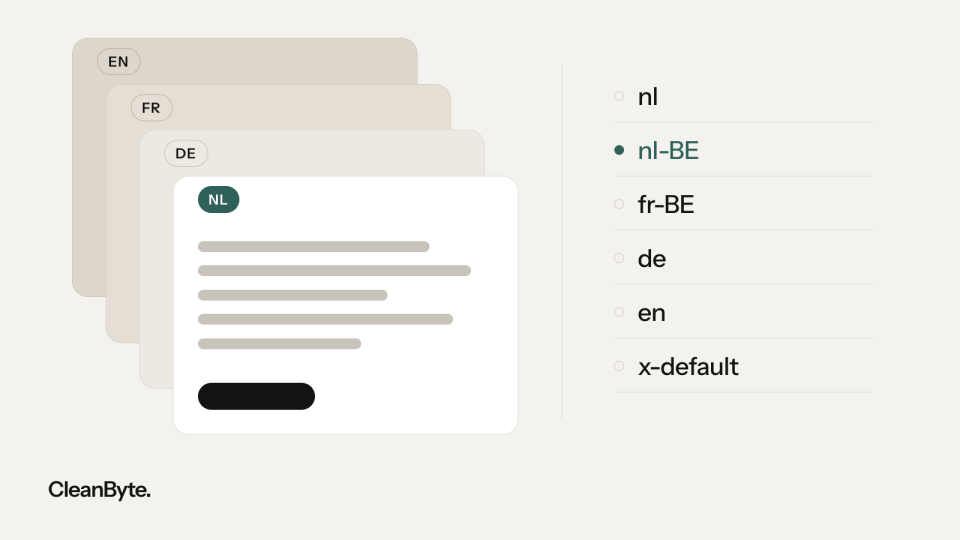
With hreflang annotations you tell search engines which pages are translations of each other. Each version refers to all other versions and to itself, and those references must be reciprocal; otherwise Google ignores them. Use the correct codes: nl for Dutch, nl-BE only if you have a separate Flemish version, fr-BE for Belgian French, de for German, de-CH for a Swiss version, en for English and x-default for the version visitors get when no language matches. Classic mistakes are ‘be’, ‘uk’ and ‘ch’ as codes: those are Belarusian, Ukrainian and Chamorro, not Belgium, the United Kingdom and Switzerland.
- Each language has its own URLs; do not switch languages with a cookie or script alone, because search engines then see only one version.
- Each language version has a canonical that points to itself, not to the original page.
- The language switcher links to the same page in the other language, not to the homepage.
- The lang attribute in the HTML is correct on every page; screen readers use it to choose the right pronunciation, and WCAG requires it.
- Titles and meta descriptions are written per language, and the sitemap includes every version.
- Do not redirect visitors automatically based on IP address or browser language. Google advises against it, partly because it crawls mainly from the United States; a suggestion such as ‘This page is also available in French’ works better.
Translating is rewriting
Machine translation is a useful first draft, but not a finished result. Have every version checked by a native speaker who knows your sector. Do not translate keywords either; research them per market: a Dutch buyer asks for an ‘offerte’, a German buyer searches for an ‘Angebot’, and the terms Flemish and Dutch buyers use sometimes differ more than you would expect. Google's Keyword Planner and the queries per country in Search Console show which words people actually use.
Also mind the details that show a site was really made for a market. Dates are written 18-10-2026 in the Netherlands, often 18/10/2026 in Belgium and 18.10.2026 in Germany. Phone numbers get the right country code (+31, +32, +49). If you show prices, state clearly for business clients that they exclude VAT. And where possible, use references and examples from that country: a German buyer would rather read about a project in Cologne than one in Utrecht.
Legal pages per country
Across the EU, a privacy policy under the GDPR, a cookie banner that only sets non-essential cookies after consent and full company details are standard. The E-Commerce Directive requires similar provider information everywhere, such as your registration and VAT numbers. Make sure these pages are available in every language you serve clients in, including your terms and conditions.
Some countries add their own requirements. Germany requires an Impressum under section 5 of the Digitale-Dienste-Gesetz, cookie consent falls under section 25 of the TDDDG, and companies selling online to consumers must meet the Barrierefreiheitsstärkungsgesetz. Switzerland is not in the EU and has its own revised Data Protection Act, in force since September 2023. Have these texts drafted or checked by someone who knows the local law: a translation of your existing terms does not automatically fit another country's law. This article is not legal advice.
Maintenance: keep every version in step
The biggest risk of a multilingual site arises after launch: the original pages are updated, the translations are not. After a year, services, contact details or terms no longer match. Prevent this with an admin area in which translations are linked and each language shows what still needs translating. Assign someone responsible for each language, and compare the versions side by side every quarter.
A step-by-step plan that works in practice:
- Choose the markets and determine the language, contact options and legal requirements for each.
- Choose the address structure; for most companies that is one domain with a subfolder per language.
- Have the core pages translated and checked by a native speaker, with keywords per market.
- Set up hreflang, canonicals, the language switcher, lang attributes and the sitemap, and test everything before going live.
- Measure per language and per country in Search Console, and expand the translated pages where the demand is.
We build websites in any language, and our own site works exactly like this: Dutch on the main domain, English and German in subfolders, with hreflang annotations for nl, nl-BE, en and de, plus x-default. Our calls are held in English; the websites themselves can be delivered in any language your markets need.
Last updated